Week of June 29, 2026
The Daily Briefing is now on for every workspace by default, with any hand-rolled Telegram or Slack morning digest folded into it automatically, and the notetaker follows a meeting when its calendar event is rescheduled.
The notetaker follows calendar reschedules
When a meeting is moved to a new time on your calendar, the notetaker now follows it. The meeting returns to upcoming and the notetaker is rescheduled to join at the new time — whether the event is pushed later, pulled earlier, or shifted to another day.
This also covers the case where a meeting's original time quietly lapses with nothing recorded and is then moved to a new slot: the notetaker no longer gets stranded showing the meeting as done against the empty original time. If the notetaker was already sitting in the now-vacated original call having captured nothing, it leaves that dead call and joins the rescheduled one.
A meeting that was already recorded is left alone — shuffling its calendar event afterward will not reopen it or send the notetaker back. And a recording in progress is never disrupted: if the notetaker is live in the call (or waiting to be let in) when a change arrives, it keeps recording. When a calendar event is deleted outright, its scheduled notetaker is cancelled so it never joins an empty slot.
Rename and archive your chats
Every chat row — in the sidebar and on the chats list — now has a ⋯ menu to rename the chat or archive it. Renaming happens in place: the title opens into a field right where it sits, you type a new name, and Enter saves it. Once you name a chat yourself, the agent stops auto-naming it, so the name you chose sticks.
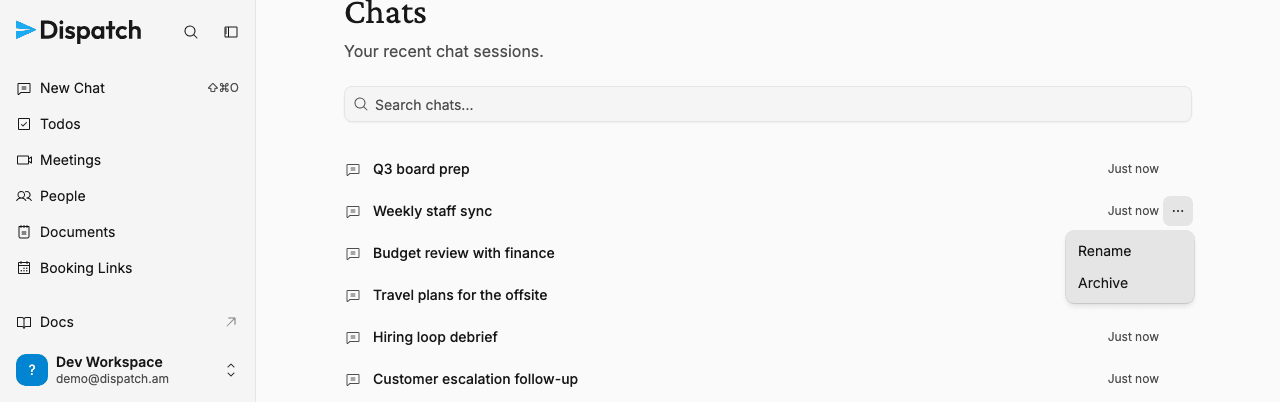
Archiving clears a chat out of every list and search result immediately, with an Undo in the confirmation toast if you change your mind. Nothing is deleted — archived chats are hidden, not destroyed. Chats the agent hasn't named yet now show up too, labeled "Untitled chat", so a brand-new thread is never invisible while you wait for a title.
The Daily Briefing is on for everyone
The Daily Briefing is now a standard part of every workspace. There is nothing to turn on: each workspace gets a briefing prepared every morning at 6:00 in its home timezone, written to a fresh dated document you can open from the sidebar. Workspaces that were already using the briefing keep their existing schedule and any prompt customizations exactly as they were.
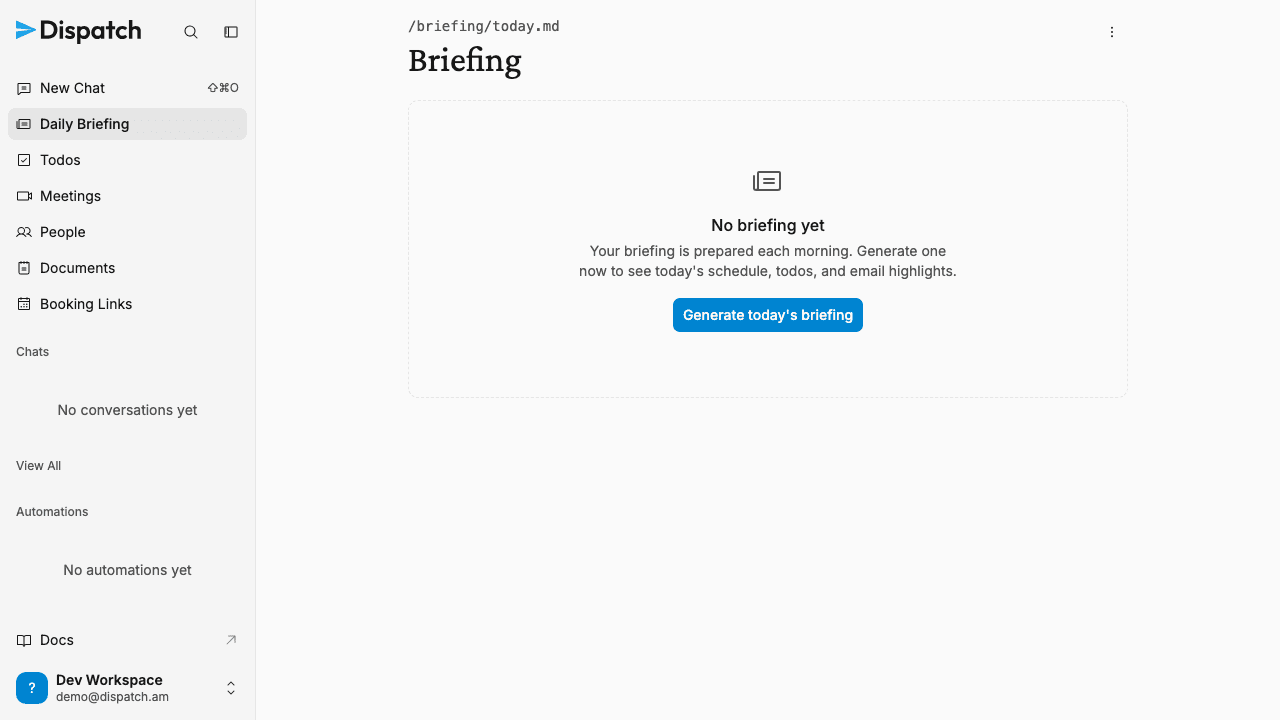
If you had already set up your own morning digest as a scheduled task that messages you on Telegram or Slack, Dispatch folds it into the native briefing for you. Your accustomed delivery time and cadence carry over, the briefing continues to reach you on the same channel in addition to the in-app document, and your content and tone preferences are preserved. The old task is then removed so you are not left with two overlapping briefings. This happens quietly in the background; when Dispatch is not confident a task is really your personal briefing, it leaves it untouched.
Smaller changes
- Links in your documents and daily notes — When Dispatch writes a reference to one of your items — a todo, a meeting, a person, or another document — into a document or a daily note, that reference is now a clickable link straight to the item, just like it already is in chat and your Daily Briefing. And Dispatch now follows one clear rule for linking everywhere it writes, so the links it hands you reliably go where they should — and things that aren't a place to navigate, like emails, stay described in prose instead of turning into dead links.
- The Daily Briefing links to what it mentions — When your morning briefing references something that already lives in Dispatch — a todo, a meeting, a person, or a document — that reference is now a real link straight to the item, so "Send the Q3 budget to finance" takes you to that todo instead of leaving you to hunt for it. Emails stay described in prose, since they aren't a place you navigate to in Dispatch.
- Ask about your briefing in place — The Daily Briefing page gained the same bottom-pinned prompt box you already use on documents, people, and meetings. Ask a question and it opens a new chat that already knows it's about today's briefing, so you can dig into your day without setting up context first.
- Tidier briefing header — The Refresh and Browse-all actions at the top of the briefing have been collapsed into a single overflow menu, keeping the page header calm. Refresh still regenerates today's briefing and Browse all still opens the archive of past briefings in Documents.
- "Daily Briefing" in the sidebar — The navigation item once labeled "Briefing" now reads "Daily Briefing", matching what the surface actually is. The icon and destination are unchanged.
- Todos no longer pile up duplicates — When a new todo covers the same task as one you already have open, Dispatch now folds it into the existing one instead of leaving two copies. Any new detail or source from the new todo is added to the original, which keeps its place in your list, and the duplicate is dismissed rather than marked done.
- "Continue with Google" reliably reaches sign-in — Fixed a case where clicking "Continue with Google" (or Microsoft) could hang before the consent screen appeared, leaving you unable to sign in. The handoff to the provider now goes through cleanly every time.
- Cleaner workspace addresses — A new workspace now takes a clean web address straight from its name —
dispatch.am/billys-workspacerather than a long trailing string of numbers — and workspace settings presents that single address in one place (the separate "My booking link" field is gone). Your booking pages still live under it atdispatch.am/book/your-workspace/intro-call, and every link you've already shared keeps working. - No duplicate actions when the agent asks for the same thing twice — If Dispatch lines up the exact same external action twice in a single step — say, sending an identical email to the same person — the permission gate now runs it once and folds the duplicate away, so you don't get two copies of the same send. The single action still goes through your normal guardrails.
- A faster default model behind chat — The agent that answers in chat, Slack, and Telegram now runs on a new default model, so everyday replies come back quicker while the agent keeps the same tools, memory, and guardrails. Nothing changes in how you chat — this is under the hood. Workspaces that bring their own Anthropic key keep running on that key's model, unchanged.
- The agent looks things up online directly in chat — In chat and in Slack and Telegram, the agent now searches the web and reads web pages itself instead of always handing off to a separate research helper, so a quick lookup comes back faster and with full detail. Background runs still route web access through the research helper, keeping untrusted web content out of unattended sessions.
- Stale tabs refresh themselves — When you come back to a Dispatch tab that's been in the background for a while, it now quietly checks whether it can still reach your data and reloads on its own if the connection went stale. No more landing on an empty list — like "0 todos" — and having to refresh the page by hand.
- Bring-your-own-key billing is being discontinued — Workspaces that run on their own Anthropic API key now see a banner to switch to Pay As You Go before July 15, 2026. After that date, automations and chat pause for bring-your-own-key workspaces until they switch. Completing the switch resumes everything with no further setup; Pay As You Go uses a mix of models and typically costs less than a Claude-only key. Workspaces already on Pay As You Go or comped billing are unaffected.
- Long-running agent work no longer gets cut off — When the agent takes on a big job — preparing for a meeting across many transcripts, working through a long list, a thorough research pass — it now keeps going for as long as the work honestly needs, picking up seamlessly where it left off instead of being killed after a few minutes. In chat the reply continues in place, with no duplicate messages or dead time. As a run nears its limit the agent is told to wrap up and hand you its best result rather than vanishing mid-thought. And a session now always shows an accurate state when it stops — no more chats stuck showing a live "working" indicator after the run has already finished.
- Rate a response in chat — Every finished assistant reply in chat now shows thumbs-up and thumbs-down buttons in its hover actions, next to copy. Rate a reply and the choice stays selected when you come back to the conversation; click the same thumb again to clear it, or the other to switch. It works on any reply in the thread, old or new.
Week of July 6, 2026
Dispatch now saves the repeatable processes you walk it through as reusable skills on its own, so you can run them again just by asking.
Week of June 22, 2026
Chat now echoes your message the instant you send it and puts your prompt back if a send fails before the agent replies, so you never lose what you typed.