Week of July 6, 2026
Dispatch now saves the repeatable processes you walk it through as reusable skills on its own, so you can run them again just by asking.
Dispatch saves your repeatable processes as skills
When you walk Dispatch through a process it's likely to do again — turning your Friday bullet notes into a structured weekly update, prepping your standup, running your investor update — it now saves that process as a reusable skill on its own, then tells you it did. Next time you can just ask for it by name instead of re-explaining the steps.
Dispatch only captures processes that are genuinely repeatable, and it refines a skill you already have rather than creating a duplicate. You stay in control: every captured skill is a file you can open, edit, or delete from your skills library.
Read your Dispatch context from another agent
An agent you point at the Dispatch MCP server can now read your Dispatch memory, not just send a message. Alongside sending a message, the server exposes three read-only tools: search, read a file, and list a directory. The connected agent searches across your people, meetings, documents, and todos, takes the file path from a result, and reads the full object — the same virtual filesystem the Dispatch agent uses internally, with the same access rules.
Reads stay read-only. To change anything, the connected agent still sends a message, so the Dispatch agent mediates every write.
Choose which account an email sends from
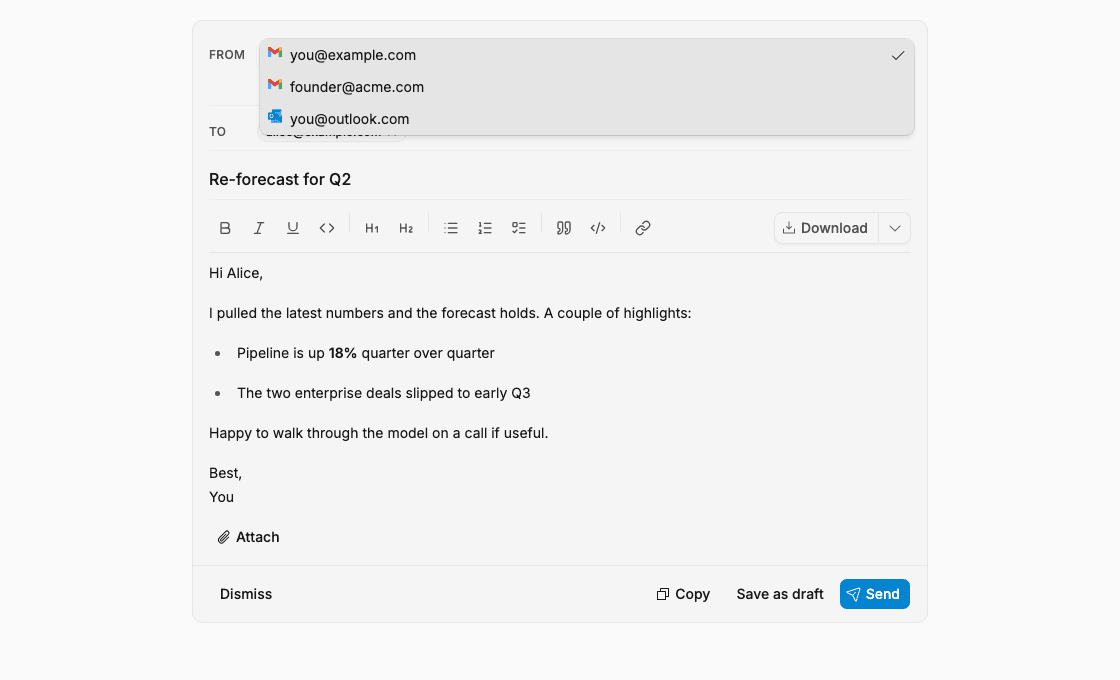
When Dispatch drafts an email and you have more than one connected sending account, the From field on the email card is now a dropdown. Pick the account you want before you send or save the draft, and the email goes out from that account, so you no longer have to regenerate it just to change the sender. When several drafts are open at once, an apply-to-all action switches the From on every pending draft in one step.
The dropdown only lists accounts you have actually connected in Gmail or Outlook, shown by their email address, so you can never send from an address you are not authorized to use.
Dispatch asks before risky third-party tool actions
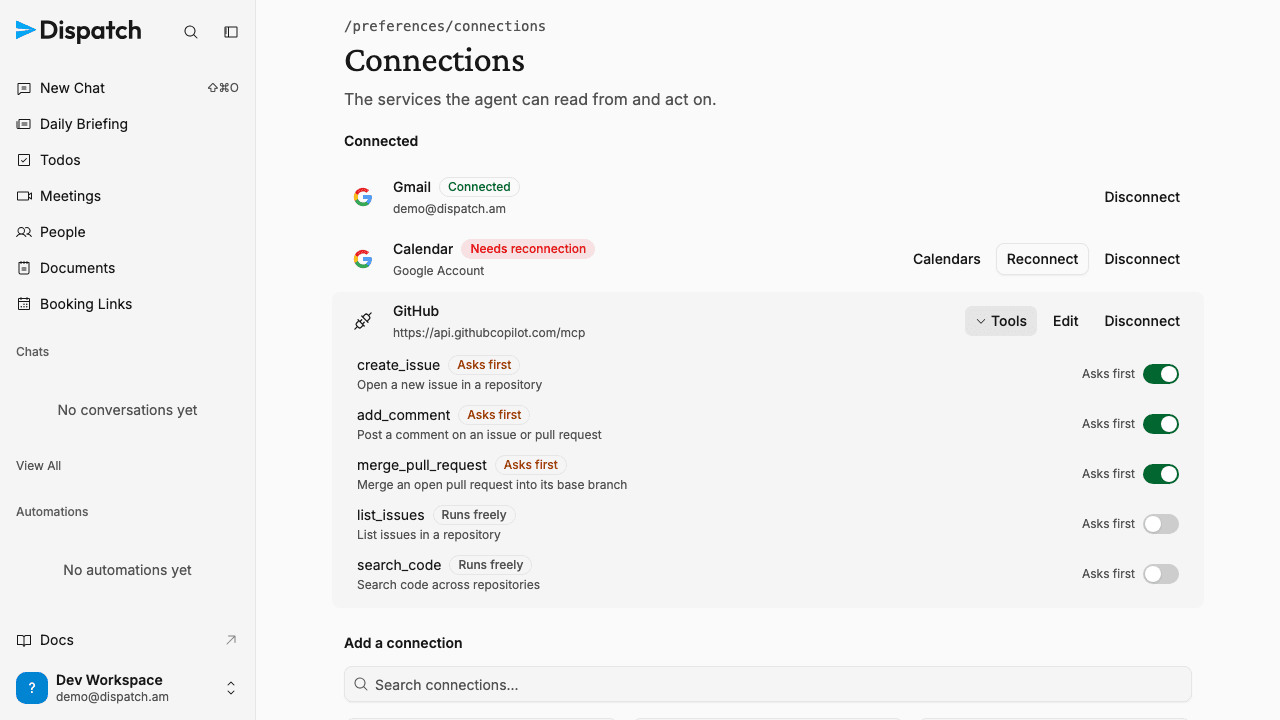
When you connect a third-party tool through an MCP server or a Composio integration, Dispatch now reviews each of that connection's tools and decides whether it can make a change worth checking with you first — sending, posting, or modifying something outside Dispatch. Those tools are treated exactly like Dispatch's own risky actions: the agent asks for your approval before it uses one, following the same permission rules you've already set.
You can see and adjust this from your connections settings. Expand a connection's Tools list to see each tool's state, and flip the "asks first" toggle either way — mark a tool safe so the agent runs it freely, or mark one risky so it always checks with you. Your choice sticks until the tool's definition changes. Newly connected tools are held back until this review finishes, so an unreviewed tool never runs on its own.
Smaller changes
- Links in the document editor behave like real links — Inside the document editor, a reference to one of your items — a todo, a meeting, a person, or another document — now carries a real web address. You can middle-click or ⌘-click it to open the item in a new tab, or right-click and copy its link address, and the copied link goes straight to the item. A plain click still opens the item the same way it always has.
- A clear path back for archived workspaces — When a workspace's subscription lapses, opening it now shows a calm reactivation screen instead of a dead end. The owner can resubscribe in a couple of clicks, anyone can reach out to us, and if you belong to more than one workspace you can jump straight to another. Reactivating restores the workspace exactly as it was.
- Usage breakdown is visible for every workspace — The Billing & Usage page now shows your daily cost by session type for all workspaces, including comped ones. The "Billing & Usage" entry always appears in the workspace menu.
- A single page error no longer takes down the whole app — If a page hits an unexpected error, Dispatch now contains it to that page and keeps your sidebar, navigation, and the rest of the workspace intact. You get a calm recovery screen with a retry, a way back home, and — for the rare case where a page is stuck after a new release — a refresh option that reliably clears it. The error is reported to us automatically.
- Todos page loads reliably in large workspaces — The Todos page no longer fails to load for workspaces with many detailed todos. Label suggestions in the detail pane are gathered within a safe read limit, and if they ever can't be gathered the page still loads without them.
- Clear reason when the notetaker can't join — When a meeting requires attendees to be signed in, the notetaker can't join and now says so. The meetings list shows "Agent couldn't attend" instead of "Agent attended," and the meeting page explains that the meeting required participants to be signed in.
- Slash-command menu is easier to scan — When you type
/in the chat prompt to run one of your skills, each option now shows the command on its own line above the skill's name. Longer commands no longer wrap or crowd out the name, so the list stays readable however you've named your skills. - Chat replies show once, not twice — In a long chat, a reply from Dispatch could occasionally appear more than once as new messages streamed in. Each message now renders exactly once, so the conversation stays clean no matter how long it runs.
- One clear way to start paying — On the Billing & Usage page, comped workspaces now get the same focused "Switch to pay-as-you-go billing" button that bring-your-own-key workspaces already had, instead of a generic plan picker. It's one self-serve step to move onto usage-based billing, with an opening credit to start. If that plan ever can't load, you'll see a note to contact us rather than a broken button.
- Workspace data export now handles any size, and shows progress — Exporting your full workspace data from workspace settings no longer stalls on large accounts. The export is built in resumable steps, so a workspace of any size finishes and produces one downloadable archive — and if a step is ever interrupted, it picks up on its own and still completes. While it's preparing, you now see a progress indicator instead of just "Preparing…", and nothing you export is ever silently truncated.
- The notetaker no longer misses meetings that get their link late — When you set Dispatch to attend a meeting that doesn't have a video link yet — like a hold that's still being arranged — it now remembers that intent instead of declining. As soon as a Meet, Zoom, or Teams link is added to the event, Dispatch schedules the notetaker automatically, with no action from you. Meetings you've explicitly opted out of stay untouched.
- Only Dispatch's actual replies reach Telegram and Slack — When Dispatch weighs whether a Telegram or Slack notification is worth sending, its private reasoning now stays private. It reaches you only with the message it decides to send, and when it decides something isn't worth a ping it simply stays quiet. In Slack, each reply arrives as one finished message rather than streaming in word by word.
- Clearer explanation of pay-as-you-go billing — The "Switch to pay-as-you-go billing" button now describes what actually happens: you add credit up front and draw it down as you use Dispatch, rather than being metered and billed after the fact. The wording matches the prepaid top-up you're really buying.
Week of July 13, 2026
Large workspace data exports now download in full and resume if interrupted, and received-email automations can be limited to mail that is still in your inbox.
Week of June 29, 2026
The Daily Briefing is now on for every workspace by default, with any hand-rolled Telegram or Slack morning digest folded into it automatically, and the notetaker follows a meeting when its calendar event is rescheduled.